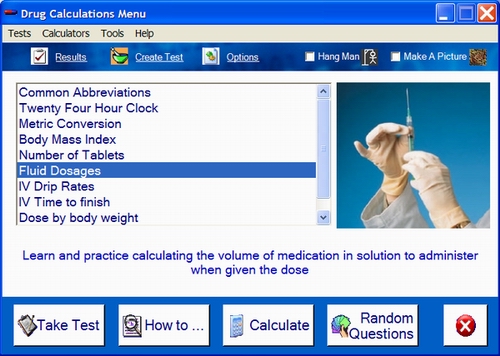
The main menu provides a simple and intuitive way to select the task you want.
Select a test by clicking on the list box. A brief description (if provided) will be displayed below the menu. The first nine tests are automatically generated by the programme. Any additional tests on the menu will have been created and deployed by users. You may check who the author was by selecting test properties from the menu bar.
Options available for the test will be displayed on the bottom of the window and if available games check boxes will appear on the top right of the screen.
 |
Double click a selected item on the menu list, click the take test button, or select one of the first 9 tests from the "Tests" pull down menu. Some tests will have a number of levels and these can be selected individually from the pull down menu. The behaviour of the test can be altered radically by changing the test options. The default setting under "options" and "incorrect answers" is to move to the next level after getting two questions correct, then questions are chosen randomly. |
 |
Some tests will have a help file, URL or document associated with them. You may access this by clicking the "How to.." button. |
 |
This will select questions randomly from the Drug Calculations generated tests. |
 |
A number of calculators are available. Select the calculator associated with the selected calculation type by clicking on the calculate button, or select any calculator from the "Calculators" drop down menu. |
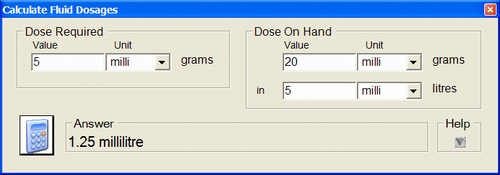
When the calculator is open simply enter values in the blank fields and click the calculator button to show the answer. How the solution was arrived at can be displayed by clicking help.

There are two game options available. Select by clicking on the associated checkbox.
Hangman creates a hang man when questions are answered incorrectly and then displays results when the hangman image is completed.
Make a picture unscrambles a picture when a question is answered correctly. The test will end when the picture is completed
 |
From the menu Drug Calculations can be terminated by clicking on the quit button. Some tests may be configured to terminate the programme on completion. |

If available the results log screen, test creator, or test options can be opened from the main menu by clicking on the button or selecting the utility from the tools menu.